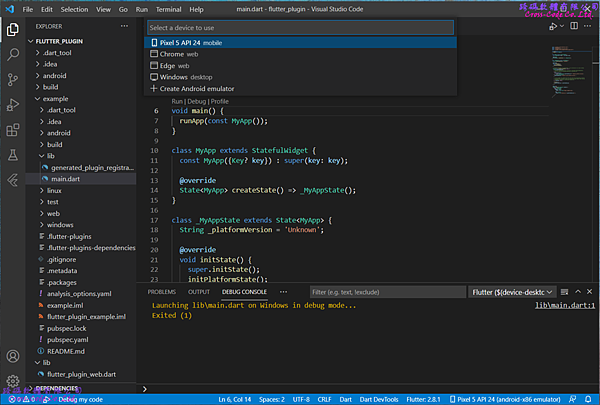
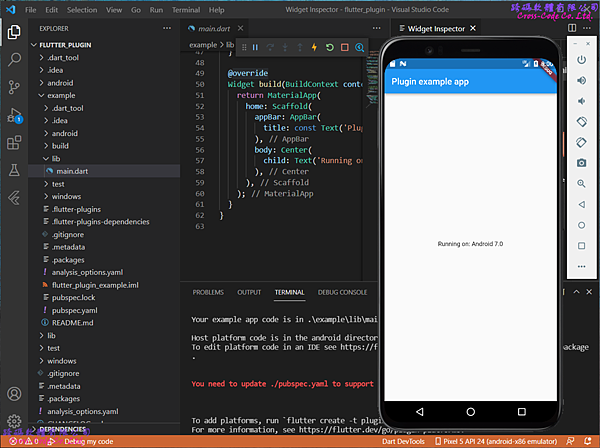
Flutter的插件(Plugin)專案範例提供建立插件(Plugin)的專案架構,而插件( Plugin )是一種特殊的Dart包 (Package)可以結合Dart碼和不同平台的程式語言。
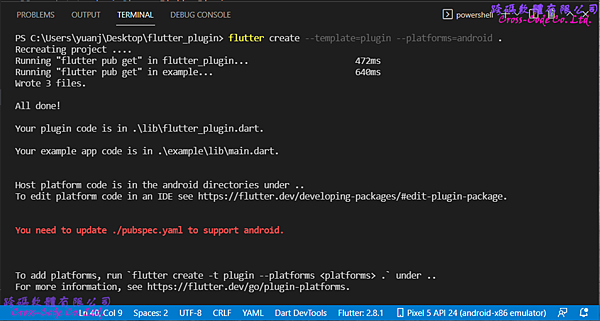
1. 建立新的Flutter專案
1-1. 開啟命令介面
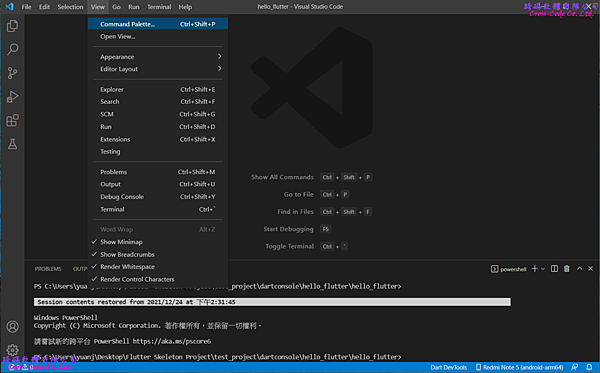
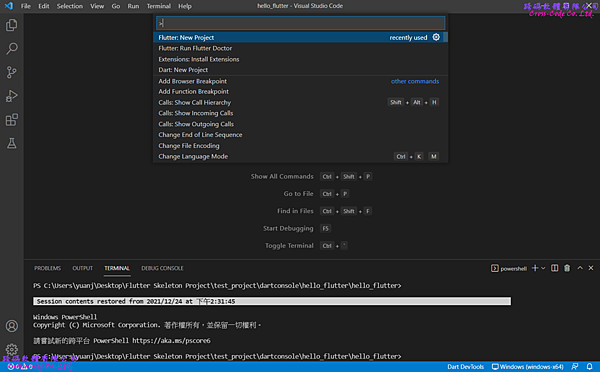
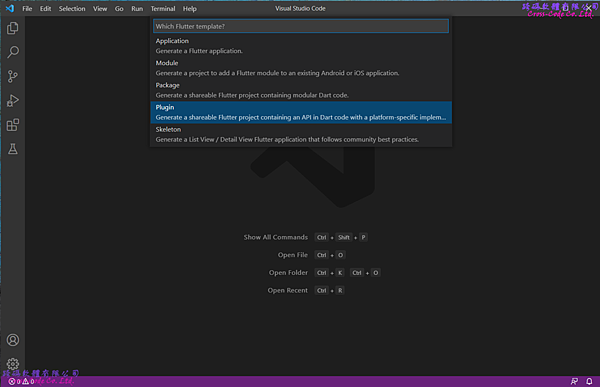
1-2. 選擇建立插件(Plugin) 專案類型
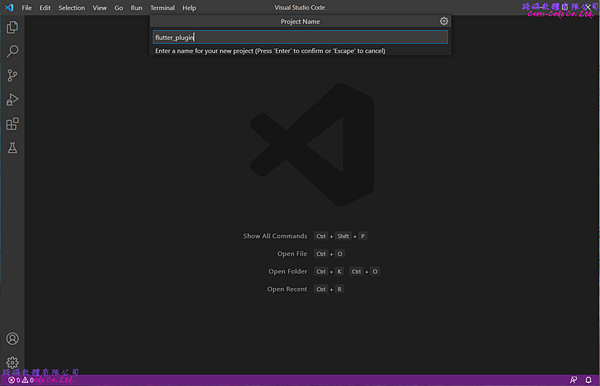
1-3. 輸入專案名稱
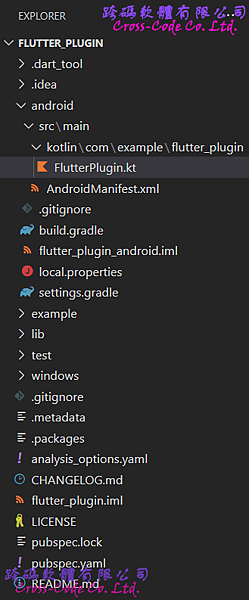
2. Flutter 預設插件專案的檔案架構
在選擇建立新的插件專案後會自動產生相關的檔案及目錄,主要的檔案如下:
2-1. lib 目錄
主要存放開發程式碼的目錄,而此範例中只提供一個簡單的範例程式檔案 。
1. flutter_plugin.dart
定義提供服務的插件(Plugin)類別,此類別主要是作為flutter 串接Dart 與執行各平台程式碼的包裝(Wrapper)程式。
1 2 3 4 5 6 7 8 9 10 11 |
import 'dart:async'; import 'package:flutter/services.dart'; class FlutterPlugin { static const MethodChannel _channel = MethodChannel('flutter_plugin'); static Future<String?> get platformVersion async { final String? version = await _channel.invokeMethod('getPlatformVersion'); return version; } } |
2. flutter_plugin_web.dart
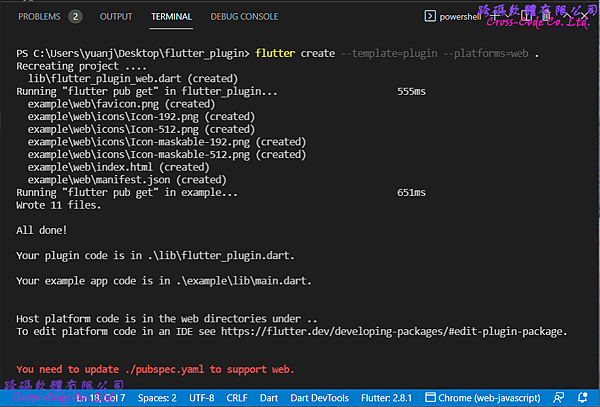
此檔案是根據pubspec.yaml和flutter_plugin.dart的內容在執行 "flutter create --template=plugin --platforms=web . " 指令產生出來且類別名稱會在原本的類別名稱上加入"Web"字串。
1 2 3 4 5 6 7 8 9 10 11 12 13 14 15 16 17 18 19 20 21 22 23 24 25 26 27 28 29 30 31 32 33 34 |
import 'dart:async'; import 'dart:html' as html show window; import 'package:flutter/services.dart'; import 'package:flutter_web_plugins/flutter_web_plugins.dart'; class FlutterPluginWeb { static void registerWith(Registrar registrar) { final MethodChannel channel = MethodChannel( 'flutter_plugin', const StandardMethodCodec(), registrar, ); final pluginInstance = FlutterPluginWeb(); channel.setMethodCallHandler(pluginInstance.handleMethodCall); } Future<dynamic> handleMethodCall(MethodCall call) async { switch (call.method) { case 'getPlatformVersion': return getPlatformVersion(); default: throw PlatformException( code: 'Unimplemented', details: 'flutter_plugin for web doesn\'t implement \'{call.method}\'', ); } } Future<String> getPlatformVersion() { final version = html.window.navigator.userAgent; return Future.value(version); } } |
3. linux 目錄
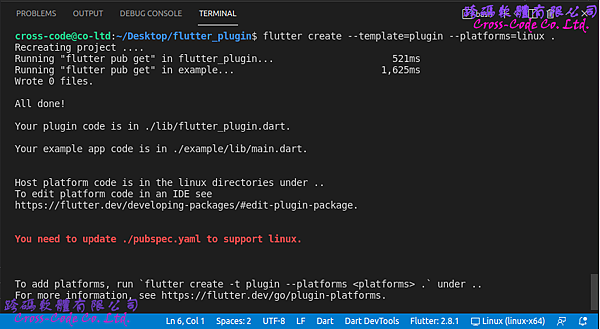
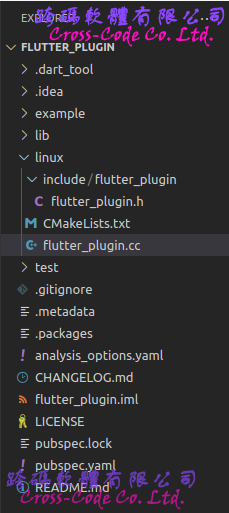
此目錄是根據 pubspec.yaml 和 flutter_plugin.dart 的內容在執行 "flutter create --template=plugin --platforms=linux . " 指令後建立 GNU C++ 語言的類別函式來串接Dart 類別的程式。
4. windows 目錄
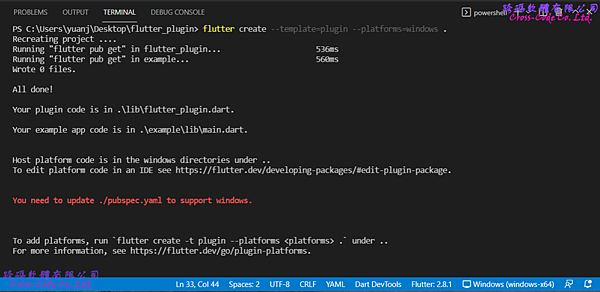
此目錄是根據 pubspec.yaml 和 flutter_plugin.dart 的內容在執行 "flutter create --template=plugin --platforms=windows . " 指令後建立Visual C++ 語言的類別函式來串接 Dart 類別的程式。
5. android 目錄
此目錄是根據 pubspec.yaml 和 flutter_plugin.dart 的內容在執行 "flutter create --template=plugin --platforms=android . " 指令後建立Kotlin 語言的類別函式來串接 Dart 類別的程式。
2-2. test 目錄
主要存放使用Flutter提供的 test 測試函數對於類別庫(library)所提供的物件進行驗證程式。
1. flutter_plugin_test.dart
測試 flutter_plugin 檔案中定義的FlutterPlugin類別是否能在不同平台上正確的執行與回傳預期資料型態。
1 2 3 4 5 6 7 8 9 10 11 12 13 14 15 16 17 18 19 20 21 22 |
import 'package:flutter/services.dart'; import 'package:flutter_test/flutter_test.dart'; import 'package:flutter_plugin/flutter_plugin.dart'; void main() { const MethodChannel channel = MethodChannel('flutter_plugin'); TestWidgetsFlutterBinding.ensureInitialized(); setUp(() { channel.setMockMethodCallHandler((MethodCall methodCall) async { return '42'; }); }); tearDown(() { channel.setMockMethodCallHandler(null); }); test('getPlatformVersion', () async { expect(await FlutterPlugin.platformVersion, '42'); }); } |
2-3. pubspec.yaml檔案
flutter 專案中的檔案配置檔,除了設定基本專案資訊並可設定專案中使用到的相依類別庫或外部資源。
1 2 3 4 5 6 7 8 9 10 11 12 13 14 15 16 17 18 19 20 21 22 23 24 25 26 27 28 29 30 31 32 33 34 35 |
name: flutter_plugin description: A new flutter plugin project. name: flutter_plugin description: A new flutter plugin project. version: 0.0.1 homepage: environment: sdk: ">=2.15.1 <3.0.0" flutter: ">=2.5.0" dependencies: flutter: sdk: flutter flutter_web_plugins: sdk: flutter dev_dependencies: flutter_test: sdk: flutter flutter_lints: 1.0.0 flutter: plugin: platforms: windows: pluginClass: FlutterPlugin android: pluginClass: FlutterPlugin package: com.example.flutter_plugin web: pluginClass: FlutterPluginWeb fileName: flutter_plugin_web.dart linux: pluginClass: FlutterPlugin |
2-4. .packages檔案
flutter 專案中設定相依類別庫檔案路徑的組態檔,建立專案的預設檔案路徑為 flutter_plugin:lib/ 而此檔案是在執行"flutter pub get"指令後根據 pubspec.yaml中的內容產生出來,設定引用類別庫格式為【路徑別名:實際路徑】。
1 2 3 4 5 6 7 8 9 10 11 12 13 14 15 16 17 18 19 20 21 22 23 24 25 26 27 28 |
async:file:///D:/flutter_windows_2.8.1-stable/flutter/.pub-cache/hosted/pub.dartlang.org/async-2.8.2/lib/ boolean_selector:file:///D:/flutter_windows_2.8.1-stable/flutter/.pub-cache/hosted/pub.dartlang.org/boolean_selector-2.1.0/lib/ characters:file:///D:/flutter_windows_2.8.1-stable/flutter/.pub-cache/hosted/pub.dartlang.org/characters-1.2.0/lib/ charcode:file:///D:/flutter_windows_2.8.1-stable/flutter/.pub-cache/hosted/pub.dartlang.org/charcode-1.3.1/lib/ clock:file:///D:/flutter_windows_2.8.1-stable/flutter/.pub-cache/hosted/pub.dartlang.org/clock-1.1.0/lib/ collection:file:///D:/flutter_windows_2.8.1-stable/flutter/.pub-cache/hosted/pub.dartlang.org/collection-1.15.0/lib/ cupertino_icons:file:///D:/flutter_windows_2.8.1-stable/flutter/.pub-cache/hosted/pub.dartlang.org/cupertino_icons-1.0.4/lib/ fake_async:file:///D:/flutter_windows_2.8.1-stable/flutter/.pub-cache/hosted/pub.dartlang.org/fake_async-1.2.0/lib/ flutter:file:///D:/flutter_windows_2.8.1-stable/flutter/packages/flutter/lib/ flutter_lints:file:///D:/flutter_windows_2.8.1-stable/flutter/.pub-cache/hosted/pub.dartlang.org/flutter_lints-1.0.4/lib/ flutter_plugin:../lib/ flutter_test:file:///D:/flutter_windows_2.8.1-stable/flutter/packages/flutter_test/lib/ flutter_web_plugins:file:///D:/flutter_windows_2.8.1-stable/flutter/packages/flutter_web_plugins/lib/ js:file:///D:/flutter_windows_2.8.1-stable/flutter/.pub-cache/hosted/pub.dartlang.org/js-0.6.3/lib/ lints:file:///D:/flutter_windows_2.8.1-stable/flutter/.pub-cache/hosted/pub.dartlang.org/lints-1.0.1/lib/ matcher:file:///D:/flutter_windows_2.8.1-stable/flutter/.pub-cache/hosted/pub.dartlang.org/matcher-0.12.11/lib/ meta:file:///D:/flutter_windows_2.8.1-stable/flutter/.pub-cache/hosted/pub.dartlang.org/meta-1.7.0/lib/ path:file:///D:/flutter_windows_2.8.1-stable/flutter/.pub-cache/hosted/pub.dartlang.org/path-1.8.0/lib/ sky_engine:file:///D:/flutter_windows_2.8.1-stable/flutter/bin/cache/pkg/sky_engine/lib/ source_span:file:///D:/flutter_windows_2.8.1-stable/flutter/.pub-cache/hosted/pub.dartlang.org/source_span-1.8.1/lib/ stack_trace:file:///D:/flutter_windows_2.8.1-stable/flutter/.pub-cache/hosted/pub.dartlang.org/stack_trace-1.10.0/lib/ stream_channel:file:///D:/flutter_windows_2.8.1-stable/flutter/.pub-cache/hosted/pub.dartlang.org/stream_channel-2.1.0/lib/ string_scanner:file:///D:/flutter_windows_2.8.1-stable/flutter/.pub-cache/hosted/pub.dartlang.org/string_scanner-1.1.0/lib/ term_glyph:file:///D:/flutter_windows_2.8.1-stable/flutter/.pub-cache/hosted/pub.dartlang.org/term_glyph-1.2.0/lib/ test_api:file:///D:/flutter_windows_2.8.1-stable/flutter/.pub-cache/hosted/pub.dartlang.org/test_api-0.4.3/lib/ typed_data:file:///D:/flutter_windows_2.8.1-stable/flutter/.pub-cache/hosted/pub.dartlang.org/typed_data-1.3.0/lib/ vector_math:file:///D:/flutter_windows_2.8.1-stable/flutter/.pub-cache/hosted/pub.dartlang.org/vector_math-2.1.1/lib/ flutter_plugin_example:lib/ |
3. Flutter 插件載入範例專案的檔案架構
在選擇建立新的插件專案後會自動產生載入插件的範例應用程式檔案及目錄,主要的檔案如下:
3-1. example\lib 目錄
主要存放開發程式碼的目錄,main.dart 中的 main 函式為啟動程式的入口函式,而此範例程式是說明如何載入自訂插件(Plugin)及執行自訂類別與函式的方法。
1. main.dart
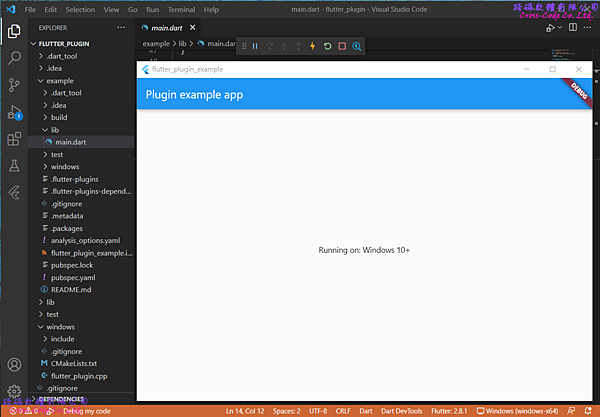
使用非同步的方式執行 flutter_plugin 檔案中定義 FlutterPlugin 類別的取得執行平台版本函式結果顯示於營幕上。
1 2 3 4 5 6 7 8 9 10 11 12 13 14 15 16 17 18 19 20 21 22 23 24 25 26 27 28 29 30 31 32 33 34 35 36 37 38 39 40 41 42 43 44 45 46 47 48 49 50 51 52 53 54 |
import 'package:flutter/material.dart'; import 'dart:async'; import 'packge:flutter/services.dart'; import 'package:flutter_plugin/flutter_plugin.dart'; void main() { runApp(const MyApp()); } class MyApp extends StatefulWidget { const MyApp({Key? key}) : super(key: key); @override State<MyApp> createState() => _MyAppState(); } class _MyAppState extends State<MyApp> { String _platformVersion = 'Unknown'; @override void initState() { super.initState(); initPlatformState(); } Future<void> initPlatformState() async { String platformVersion; try { platformVersion = await FlutterPlugin.platformVersion ?? 'Unknown platform version'; } on PlatformException { platformVersion = 'Failed to get platform version.'; } if (!mounted) return; setState(() { _platformVersion = platformVersion; }); } @override Widget build(BuildContext context) { return MaterialApp( home: Scaffold( appBar: AppBar( title: const Text('Plugin example app'), ), body: Center( child: Text('Running on: _platformVersion\n'), ), ), );} } |
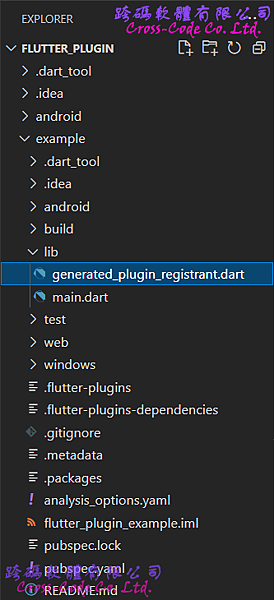
2. generated_plugin_registrant.dart
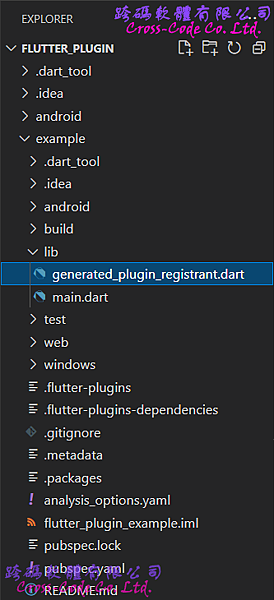
此檔案是根據 pubspec.yaml 和 flutter_plugin.dart 的內容在執行 "flutter create --template=plugin --platforms=web . " 指令產生出來且類別名稱是根據插件 (Plugin) 的 pubspec.yaml中依據指定平台所定義的類別名稱,而且名稱必須是符合原先定義類別名稱 + "Web"字串的格式。
1 2 3 4 5 6 7 |
import 'package:flutter_plugin/flutter_plugin_web.dart'; import 'package:flutter_web_plugins/flutter_web_plugins.dart'; void registerPlugins(Registrar registrar) { FlutterPluginWeb.registerWith(registrar); registrar.registerMessageHandler(); } |
3-2. example\test 目錄
主要存放使用Flutter提供的 test 測試函數對於類別庫(library)所提供的物件進行驗證程式。
1. widget_test.dart
使用testWidgets函式測試 flutter_plugin 檔案中定義的FlutterPlugin類別在載入後在不同的平台上執行是否會影響應用程式的執行,因此此程式只是確認在建立此應用程式後是否在介面上有產生 textWidget物件和此物件顯示的字串包含 "Running on:"。
1 2 3 4 5 6 7 8 9 10 11 12 13 14 15 16 17 18 |
import 'package:flutter/material.dart'; import 'package:flutter_test/flutter_test.dart'; import 'package:flutter_plugin_example/main.dart'; void main() { testWidgets('Verify Platform version', (WidgetTester tester) async { await tester.pumpWidget(const MyApp()); expect( find.byWidgetPredicate( (Widget widget) => widget is Text && widget.data!.startsWith('Running on:'), ), findsOneWidget, ); }); } |
3-3. example\pubspec.yaml檔案
flutter 專案中的檔案配置檔,除了設定基本專案資訊並可設定專案中使用到的相依類別庫或外部資源;而使用插件( Plugin) 時需要設定載入插件 (Plguin) 的檔案名稱與路徑在使用插件 (Plugin) 專案的pubspec.yaml。
1 2 3 4 5 6 7 8 9 10 11 12 13 14 15 16 17 18 19 20 21 22 23 24 |
name: flutter_plugin_example description: Demonstrates how to use the flutter_plugin plugin. publish_to: 'none' environment: sdk: ">=2.15.1 <3.0.0" dependencies: flutter: sdk: flutter flutter_plugin: path: ../ cupertino_icons: 1.0.2 dev_dependencies: flutter_test: sdk: flutter flutter_lints: 1.0.0 flutter: uses-material-design: true |
3-4. example\.packages檔案
flutter 專案中設定相依類別庫檔案路徑的組態檔,建立專案的預設檔案路徑為 flutter_plugin_example:lib/ 而此檔案是在執行"flutter pub get"指令後根據 pubspec.yaml中的內容產生出來,設定引用類別庫格式為【路徑別名:實際路徑】。
1 2 3 4 5 6 7 8 9 10 11 12 13 14 15 16 17 18 19 20 21 22 23 24 25 26 27 28 |
async:file:///D:/flutter_windows_2.8.1-stable/flutter/.pub-cache/hosted/pub.dartlang.org/async-2.8.2/lib/ boolean_selector:file:///D:/flutter_windows_2.8.1-stable/flutter/.pub-cache/hosted/pub.dartlang.org/boolean_selector-2.1.0/lib/ characters:file:///D:/flutter_windows_2.8.1-stable/flutter/.pub-cache/hosted/pub.dartlang.org/characters-1.2.0/lib/ charcode:file:///D:/flutter_windows_2.8.1-stable/flutter/.pub-cache/hosted/pub.dartlang.org/charcode-1.3.1/lib/ clock:file:///D:/flutter_windows_2.8.1-stable/flutter/.pub-cache/hosted/pub.dartlang.org/clock-1.1.0/lib/ collection:file:///D:/flutter_windows_2.8.1-stable/flutter/.pub-cache/hosted/pub.dartlang.org/collection-1.15.0/lib/ cupertino_icons:file:///D:/flutter_windows_2.8.1-stable/flutter/.pub-cache/hosted/pub.dartlang.org/cupertino_icons-1.0.4/lib/ fake_async:file:///D:/flutter_windows_2.8.1-stable/flutter/.pub-cache/hosted/pub.dartlang.org/fake_async-1.2.0/lib/ flutter:file:///D:/flutter_windows_2.8.1-stable/flutter/packages/flutter/lib/ flutter_lints:file:///D:/flutter_windows_2.8.1-stable/flutter/.pub-cache/hosted/pub.dartlang.org/flutter_lints-1.0.4/lib/ flutter_plugin:../lib/ flutter_test:file:///D:/flutter_windows_2.8.1-stable/flutter/packages/flutter_test/lib/ flutter_web_plugins:file:///D:/flutter_windows_2.8.1-stable/flutter/packages/flutter_web_plugins/lib/ js:file:///D:/flutter_windows_2.8.1-stable/flutter/.pub-cache/hosted/pub.dartlang.org/js-0.6.3/lib/ lints:file:///D:/flutter_windows_2.8.1-stable/flutter/.pub-cache/hosted/pub.dartlang.org/lints-1.0.1/lib/ matcher:file:///D:/flutter_windows_2.8.1-stable/flutter/.pub-cache/hosted/pub.dartlang.org/matcher-0.12.11/lib/ meta:file:///D:/flutter_windows_2.8.1-stable/flutter/.pub-cache/hosted/pub.dartlang.org/meta-1.7.0/lib/ path:file:///D:/flutter_windows_2.8.1-stable/flutter/.pub-cache/hosted/pub.dartlang.org/path-1.8.0/lib/ sky_engine:file:///D:/flutter_windows_2.8.1-stable/flutter/bin/cache/pkg/sky_engine/lib/ source_span:file:///D:/flutter_windows_2.8.1-stable/flutter/.pub-cache/hosted/pub.dartlang.org/source_span-1.8.1/lib/ stack_trace:file:///D:/flutter_windows_2.8.1-stable/flutter/.pub-cache/hosted/pub.dartlang.org/stack_trace-1.10.0/lib/ stream_channel:file:///D:/flutter_windows_2.8.1-stable/flutter/.pub-cache/hosted/pub.dartlang.org/stream_channel-2.1.0/lib/ string_scanner:file:///D:/flutter_windows_2.8.1-stable/flutter/.pub-cache/hosted/pub.dartlang.org/string_scanner-1.1.0/lib/ term_glyph:file:///D:/flutter_windows_2.8.1-stable/flutter/.pub-cache/hosted/pub.dartlang.org/term_glyph-1.2.0/lib/ test_api:file:///D:/flutter_windows_2.8.1-stable/flutter/.pub-cache/hosted/pub.dartlang.org/test_api-0.4.3/lib/ typed_data:file:///D:/flutter_windows_2.8.1-stable/flutter/.pub-cache/hosted/pub.dartlang.org/typed_data-1.3.0/lib/ vector_math:file:///D:/flutter_windows_2.8.1-stable/flutter/.pub-cache/hosted/pub.dartlang.org/vector_math-2.1.1/lib/ flutter_plugin_example:lib/ |
4. 執行各平台Flutter 偵錯自訂包(Package)
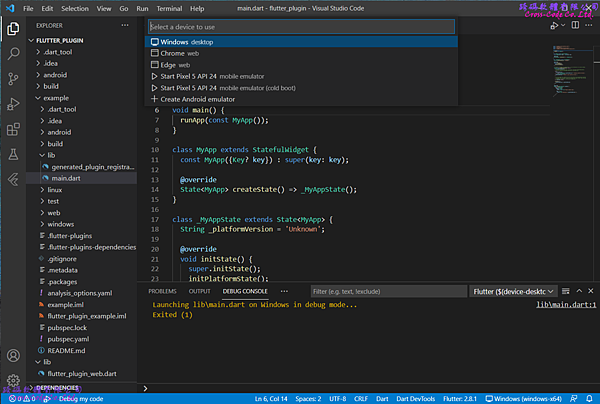
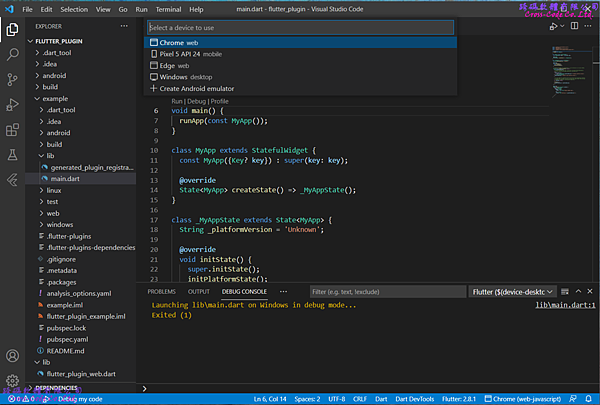
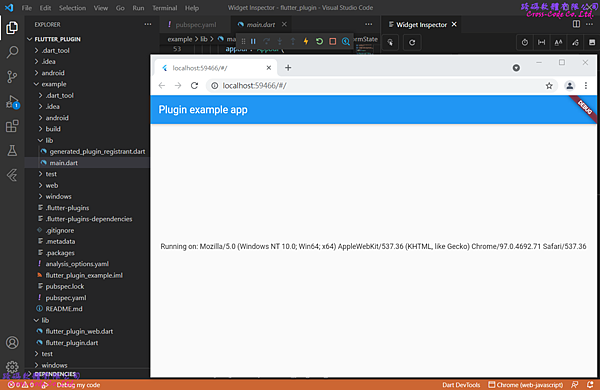
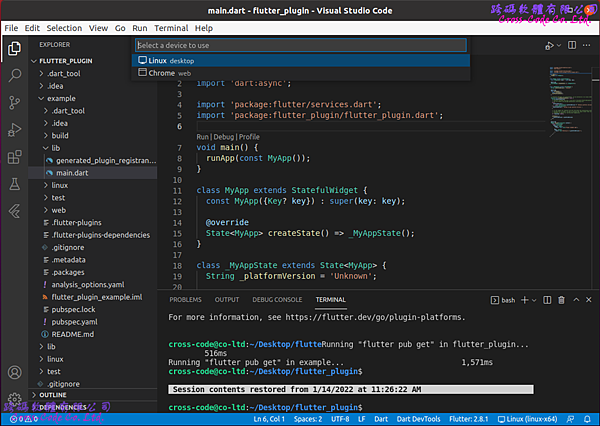
點選右下角No Devices項目後切換至要執行偵錯的平台並執行 Run -> Start Debugging (F5) 進行偵錯
4-1. Windows Desktop
4-2. Chrome Web
4-3. Linux APP (Ubuntu)

4-4. Android APP